
How to remove shortcut viruses From USB
Whenever we plug in a USB drive , there might be chances that there are shortcut viruses in that drive , then we need to remove those viruses . In this post I will show you how to remove these shortcut viruses from any drive.
 |
| cmd |
Just follow these easy steps::-
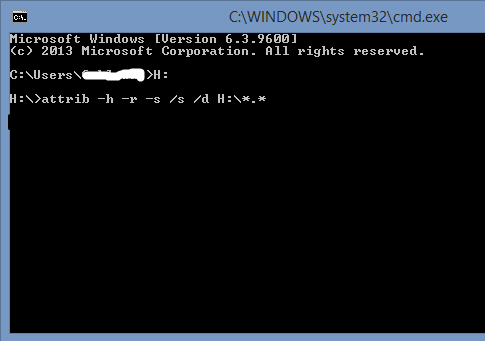
1) Open command prompt by typing 'cmd' in run and press enter.
2) Open the drive from where u wanna remove the shortcuts by writing the drive name as " I: " and hit enter .(My drive name is "I" , yours may be different )
3) Then type or u can copy this command in cmd attrib -h -r -s /s /d I:\*.* and press enter .
4) You will see a message of access denied something but dont worry the shortcuts are removed.
Thats all , You are done, all shortcut viruses havr been removed.
You can comment below if you have any problem or contact us on contact us page.

.PNG)


Post a Comment